No, hashtags no longer help people find your Pins. Pinterest staff said in 2023 that a hashtag search now shows normal results for the query, not results for the hashtag. They recommend plain keywords instead.
"Tag" also means three other things on Pinterest, and one of them, tagged topics, still helps people find your Pins. This guide covers what changed with hashtags, what to write instead, and how the four kinds of tags differ.
Key Takeaways
- Pinterest staff said in 2023 that hashtags "will no longer return results of the hashtag". They recommend replacing hashtags with words that help discovery.
- You can still type hashtags into a Pin description. They just no longer put your Pin in a hashtag feed.
- Pinterest gives no recommended number of hashtags. Counts like "3 to 5" come from community advice, not Pinterest.
- Of the four kinds of tags, only tagged topics (up to 10 per Pin) are there to help people find your Pin.
- The Pinterest tag is code for your website that tracks visitors from ads. It isn't a Pin feature.
Do hashtags still work on Pinterest?
Not for getting found. On Pinterest's business community forum, the official community manager account PinterestIvy answered this on October 16, 2023. It wrote: "We recommend replacing hashtags with words that can help with discoverability."
The same answer explains what changed: "Hashtags will no longer return results of the hashtag, but rather show the search query without the #" (Pinterest Business Community). In practice, a hashtag no longer gets your Pin into a hashtag feed.
Another Pinterest staff account repeated the advice in Portuguese on January 25, 2024. In our translation, it said hashtags are "no longer preferred by our system" because the method "was used abusively to send spam content" (Pinterest Business Community, in Portuguese).
Hashtags are still allowed, which is why this is confusing. Pinterest's steps for creating a Pin in the app say: "Write a description of your Pin (you can also include hashtags)" (Pinterest Help: Build a Pin). The box accepts them. Pinterest's own staff just say they no longer bring up hashtag results, so we don't expect them to add reach.
Should you remove hashtags from old Pins?
You don't need to. We haven't found any Pinterest statement saying hashtags hurt a Pin or get it penalized. Pinterest staff only say they're no longer preferred.
In our opinion, editing hundreds of old descriptions isn't worth the time. Leave old Pins as they are, and put that time into new Pins with clear keywords. If you edit an old Pin for another reason, you can rewrite its hashtags as plain phrases then.
What to use instead: keywords
Write the words people search for as normal text. That's what Pinterest staff recommend: "words that can help with discoverability". For boards, Pinterest's community team also advises: "Use clear, keyword-rich titles that show what your board offers" (Pinterest Business Community, 2025).
Turning a hashtag into a keyword phrase takes seconds:
| Instead of this hashtag | Write this phrase |
|---|---|
| #smallbedroomideas | small bedroom ideas |
| #easydinnerrecipes | easy dinner recipes |
| #christmasgiftideas | christmas gift ideas |
Our advice is to put the main phrase near the start of the Pin title, then use it naturally in the description. For each field and the limits Pinterest publishes, see our guide on how to add keywords to your pins.
The four kinds of tags on Pinterest
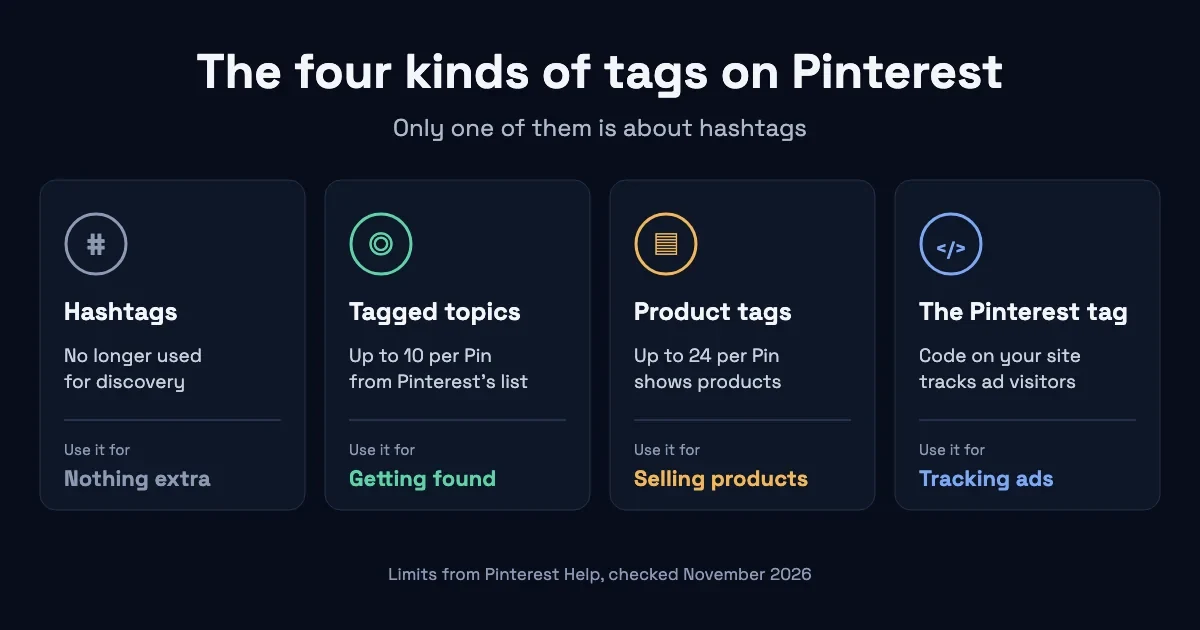
"Pinterest tags" can mean four different features. Of the four, only tagged topics are there to help people find your Pin.
| Name | Limit | What it does | Helps people find your Pin? |
|---|---|---|---|
| Hashtags | None published | Words with a # in the description | No longer, per Pinterest staff |
| Tagged topics | Up to 10 per Pin | Topics from Pinterest's list | Yes, that's their purpose |
| Product tags | Up to 24 per Pin | Shows products below or beside your Pin | No, they show products |
| The Pinterest tag | Not applicable | Website code for tracking ads | No, it's for ads |
Sources: the Pinterest Help pages and Pinterest staff posts linked in this article, checked November 7, 2026.
Hashtags
Hashtags are words with a # in front, typed into the Pin description. Pinterest staff said in 2023 that a hashtag search shows normal results for the query, so a hashtag no longer gets your Pin into a hashtag feed.
Tagged topics
Tagged topics are topics you pick from Pinterest's list under "Tag related topics" when you create a Pin. Pinterest says: "You can add up to 10 related topics to help people searching for similar ideas find your Pin" (Pinterest Help: Build a Pin). This is the tag feature worth filling in.
Product tags
Product tags link your Pin to products, under "Tag products" in the Pin builder. Pinterest lets you "Tag your Pin with up to 24 of your related products or other merchants' products". The tagged products "will not show up in your Pin, but will be surfaced below or to the side of your Pin" (Pinterest Help: Tag your products). They're there to help shoppers find products.
The Pinterest tag
The Pinterest tag isn't a Pin feature at all. Pinterest describes it as "a piece of code that you add to your website". It "lets Pinterest track visitors to your site, as well as the actions they take on your site after seeing your Pinterest ad" (Pinterest Help: Install the Pinterest tag). If you don't run Pinterest ads, you can skip it.
How to find the keywords people search
Start with Pinterest's own search bar. Type a topic and note the suggestions that appear, since they show related searches. Then check a phrase in Pinterest Trends to see when interest rises and falls. Our post on evergreen vs seasonal Pinterest keywords shows how to read that line.
For the full method, follow the step-by-step Pinterest keyword research guide. PinDepth, our own Pinterest keyword research tool, does this at scale. It builds the full keyword tree for a niche, with Pinterest search volumes and evergreen or seasonal labels.
Common mistakes
Using a hashtag generator. A long list of hashtags won't get your Pin into hashtag results, because Pinterest staff say hashtags no longer return them.
Stuffing the description. A description full of hashtags is hard to read. In our view, two clear sentences with your keyword do the job better.
Treating "3 to 5 hashtags" as a rule. We found no Pinterest source for any number. Advice like "Add 3–5 hashtags per pin" comes from community members, for example in this forum thread, not from Pinterest staff.
Mixing up the Pinterest tag and tagged topics. One is website code for ads. The other is a Pin feature that helps discovery.
Frequently asked questions
Can you use hashtags on Pinterest?
Yes. Pinterest still lets you include hashtags in a Pin description. Pinterest staff say they no longer return hashtag results, so they won't put your Pin in a hashtag feed.
How many hashtags should I use on Pinterest?
Pinterest doesn't give a number, and you don't need any. Put your keyword in the title and description instead.
Do hashtags hurt your Pins?
We haven't found any Pinterest statement saying so. Pinterest staff only say hashtags are no longer preferred and recommend keywords instead.
What is the Pinterest tag?
It's code you add to your website. It tracks visitors and their actions after they see your Pinterest ads. It isn't a hashtag, a tagged topic or a product tag.
What are tagged topics on Pinterest?
They're topics you choose from Pinterest's list when you create a Pin. You can add up to 10, and Pinterest says they help people searching for similar ideas find your Pin.
Find the keywords that replace hashtags
Without hashtags doing any work, the keyword itself matters more. PinDepth starts from your niche and shows the keywords people search on Pinterest, marked evergreen or seasonal. Join the waitlist for a 5-day free trial.
About the author
Soufiane is the founder of PinDepth. Soufiane grows Pinterest accounts and built the tool to automate the keyword research behind them. Read more about PinDepth, browse the PinDepth blog, or contact us.
How we source: platform facts come from Pinterest Help pages and posts by Pinterest staff, quoted and dated. Our own opinions are labelled as such.