PinDepth pulls real search volume, trend data, and full keyword hierarchies directly from Pinterest — then classifies them as evergreen or seasonal, automatically. Plus pin-level and competitor account intelligence, all pulled live. Start with a 5-day free trial.
We're testing with 5 people at a time, first come first served — each gets a 5-day window with the full tool. Join the list and we'll email you when it's your turn. Use an inbox you actually check — signups from temporary or disposable addresses aren't invited.
Data is pulled from Pinterest's own search engine and Trends API — not scraped through a third-party aggregator. What you see is what real users are searching for, right now.
Every keyword gets classified against 2 years of trend data. Know whether a keyword works year-round or only peaks in a specific season before you build content around it. How to tell the difference →
Each classified root keyword becomes a board. Everything discovered underneath it in the deep dive — board sections, then pins, or pins directly — comes from that same tree. One research run gives you the full board-and-pin map, ready to build out.
Research, classification, and deep dive each run as their own step — set it up, hit run, and walk away while PinDepth works in the background. Review the results, then move to the next step. Hours of manual work done for you, one step at a time.
Paste one pin URL or a whole list. Get saves, repins, reactions, comments, board and pinner detail — plus Annotated Interests, the topics Pinterest itself assigns to a pin, and any hashtags the pinner used. Export straight to CSV. Nothing saved on our end.
Crawl Pinterest search for any keyword and get the real top-ranking pins — position, full stats, an engagement-based Pin Score, and the Annotated Interests and hashtags behind every pin that ranks. Not an estimate, the actual results.
Followers, monthly views, every board's saves and last-pinned date — then drill into a board's actual pins, Annotated Interests included. Single account or bulk, exportable at every level.
Import your own Pinterest Analytics CSV exports and see impressions, engagement, saves, and outbound clicks broken down by board — parsed entirely in your browser.
Choose from Pinterest's official taxonomy — Fashion, Home Decor, Food, Travel, and more. Set how deep you want to go. PinDepth fetches real search volumes as it goes.
Cross-reference every keyword against 2 years of Pinterest Trends data. Know instantly whether it's evergreen (steady year-round) or seasonal (peaks at specific months) — or flagged if Pinterest has no data for it yet.
Expand each classified root keyword (board) into a full autocomplete tree — board sections, then pins, or pins directly. Root keywords are processed highest-potential first, ranked by trend data, and timed to the month you'll actually post — accounting for Pinterest's indexing lag.
Get every board (root keyword), its sections, and every pin in one structured export — ready to feed into your content creation system to produce and plan the actual pins and boards.
Four more tools alongside keyword research — live Pinterest data on pins, rankings, and competitors, plus your own account analytics.
Paste one pin URL or a whole list. Get saves, repins, reactions, comments, board and pinner detail — plus Annotated Interests, the topics Pinterest itself assigns to a pin, and any hashtags the pinner used. Export straight to CSV. Nothing saved on our end.
Crawl Pinterest search for any keyword and get the real top-ranking pins — position, full stats, an engagement-based Pin Score, and the Annotated Interests and hashtags behind every pin that ranks. Not an estimate, the actual results.
Followers, monthly views, every board's saves and last-pinned date — then drill into a board's actual pins, Annotated Interests included. Single account or bulk, exportable at every level.
Import your Pinterest Analytics CSV exports and see impressions, engagement, saves, and outbound clicks broken down by board — parsed entirely in your browser.
Five more tools are already planned — here's what's coming next.
Bookmark pins from Pin Analysis or Top Pins into persistent collections you can revisit anytime.
A persistent keyword library per project — save research once, reference it anytime without re-running it.
Track how specific pins rank for target keywords over time, with historical trend charts instead of a one-off snapshot.
Monitor how Pinterest's search suggestions shift over time for your target keywords.
Analyze outbound domains and backlinks across pins at scale — see which sites are gaining traction on Pinterest.
Short walkthroughs of the real workflow — from pulling keyword ideas out of Pinterest's taxonomy to the finished, ready-to-use keyword map.
Behind the scenes the app shows these as keyword "depth levels" — in the videos below, the root keyword is the board, and everything discovered underneath it becomes board sections, then pins — or pins directly.
Pull keyword ideas straight from Pinterest's official taxonomy across your whole niche.
Classify keywords as evergreen or seasonal against real Pinterest Trends data — and see exactly which ones Pinterest has no data for yet.
Expand your top root keywords (boards) into a full hierarchy of board sections and pins.
The finished keyword map — boards, sections, and pins, ready to feed into your content creation system to produce and plan content.
Pull live stats for any pin, single or bulk — saves, repins, reactions, comments, board and pinner detail, plus Annotated Interests and hashtags, exportable to CSV.
Crawl Pinterest search for any keyword and see the real top-ranking pins — position, full stats, an engagement-based Pin Score, plus Annotated Interests and hashtags.
Analyze any competitor's account — followers, monthly views, every board's stats — then drill into a board's actual pins, Annotated Interests included.
Upload your own Pinterest Analytics CSV exports and see impressions, engagement, saves, and clicks by board — parsed entirely in your browser.
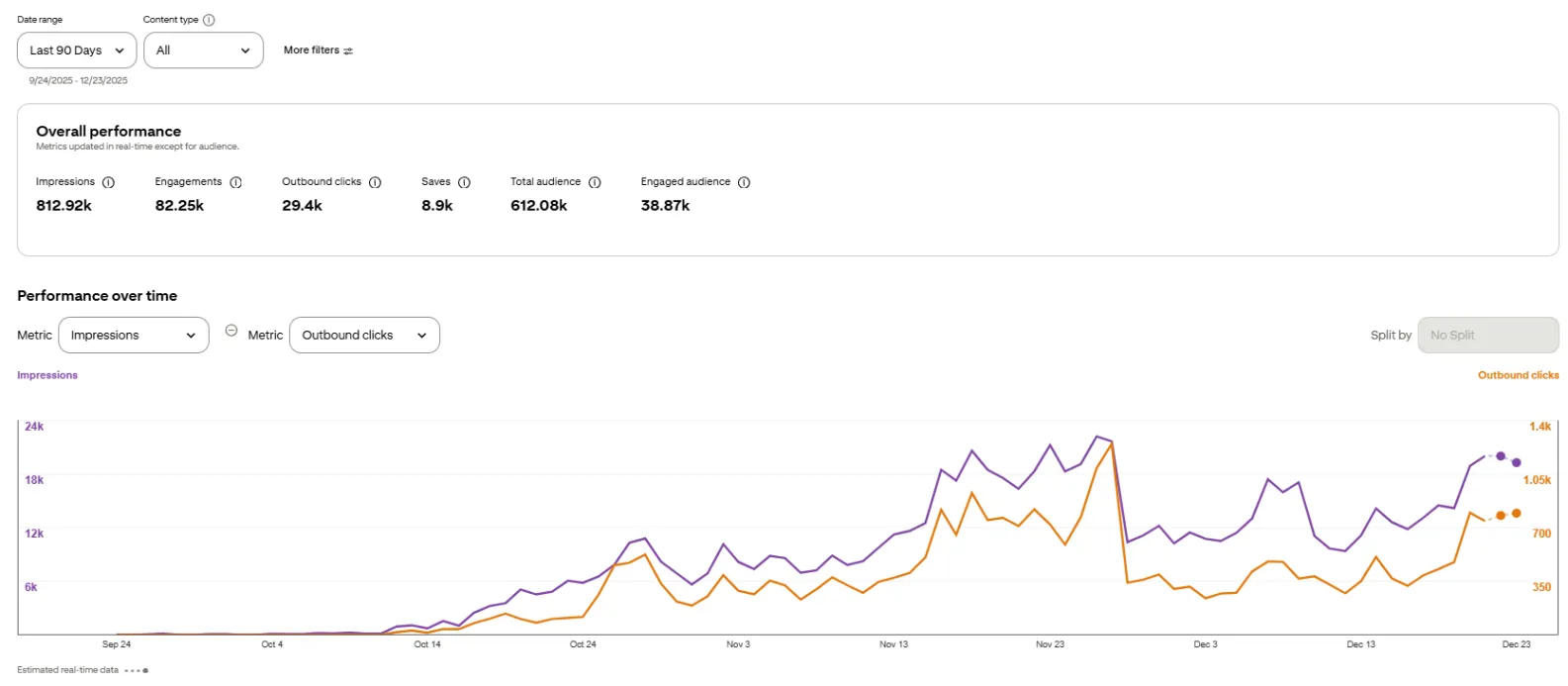
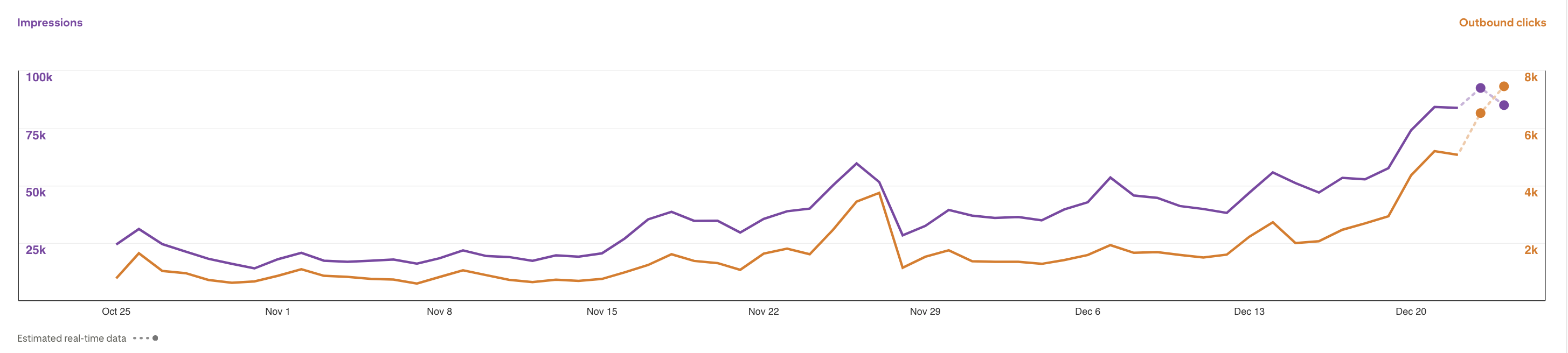
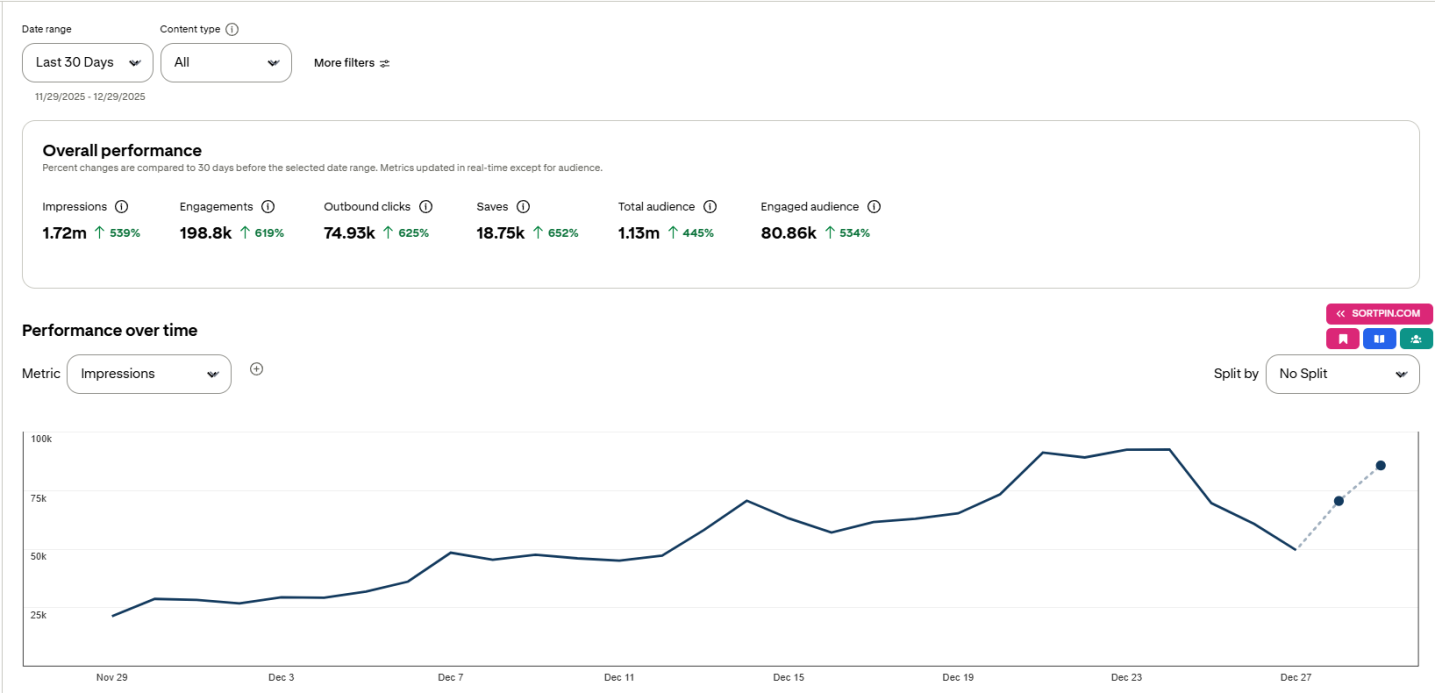
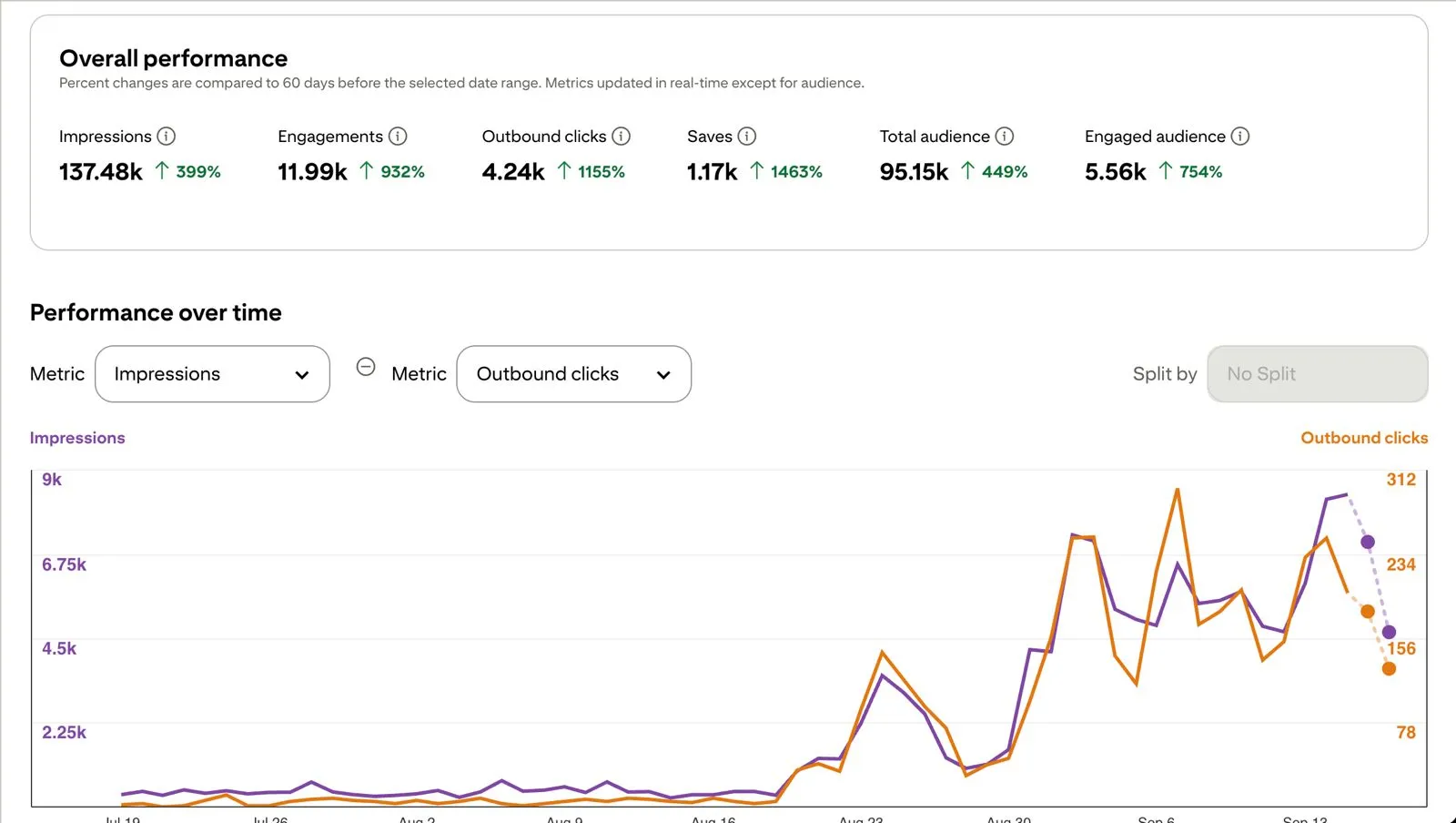
Real Pinterest Analytics from early users who researched their keywords with PinDepth — straight from their own dashboards, not a demo.
Screenshots shared by early users. Results vary — these aren't a guarantee.
While PinDepth access is still a 5-day free trial, you can order a done-for-you keyword research report built directly from the tool — same data, same output, delivered to your inbox.
3 root keywords · 3 boards · ~324 pin ideas
6 root keywords · 6 boards · ~648 pin ideas
9 root keywords · 9 boards · ~972 pin ideas
Each report is custom-built for your niche, which takes time while the tool isn't public yet — so spots are limited each week.
These one-off reports are separate from the tool — but buying one gets you 50% off your first month when PinDepth launches, if you claim it within 30 days of launch.
The process works the same whether you do it by hand or with a tool. Here it is end to end, in the order that actually saves you time.
Most people open Pinterest, type one phrase, and write down the suggestions. That gives you a flat list of near-duplicates competing with each other. Start one level up instead: pick the niche you actually publish in — "weeknight dinners", "small bathroom renovations", "capsule wardrobes" — and treat it as the root of a tree. Everything below branches from it. The structure matters because Pinterest itself is organised in branches: a board holds sections, sections hold pins. Research shaped like the platform turns into boards and pins without a second pass.
Pinterest's own search bar is the most reliable source of Pinterest keywords, because the suggestions come from what people type into Pinterest — not from Google. Type your niche and write down every autocomplete suggestion. Then type your niche followed by each letter of the alphabet and collect those too. Pay attention to the tiles that appear under the search bar after you search: those are Pinterest's own guided-search refinements, and they tell you how the platform subdivides your topic. Repeat one level deeper on the three or four most promising branches.
A long list is useless until you know which phrases people actually search. Pinterest Trends is the free, first-party source: it shows relative search interest over time for a term, in a given country. Check each root keyword and discard the branches with no measurable interest. Two cautions. Trends covers a limited set of countries, so check the one your audience is in. And a term with no data is not necessarily dead — it may just be too small to report, which for a narrow niche can be fine.
This is the step most people skip, and it decides your calendar. Pull up two years of trend data for each keyword and look at the shape of the line. Flat or gently rising across both years is evergreen: it earns traffic every month, so it is worth your best effort and worth updating rather than replacing. A line that spikes at the same point in both years is seasonal: it will look like a failure for ten months and carry you for two. One spike in one year only is noise, not a season. Sort every keyword into one of those three buckets and the rest of the plan writes itself.
Pinterest is a slow index. A new pin rarely performs the week you post it; it accumulates. Pinterest's own guidance is to publish seasonal content roughly 30 to 45 days before you want it seen, and in practice earlier is safer for anything competitive. So take each seasonal keyword's peak month from step 4 and subtract. If "thanksgiving tablescapes" peaks in the second week of November, it goes live in late September — which means you research it in August. Evergreen keywords have no such deadline, which makes them the right thing to publish in the gaps between seasonal pushes.
Map the structure you built in step 1 onto Pinterest's own: the root keyword becomes a board, each branch becomes a section within it, and the specific long-tail phrases become individual pins. Use the keyword in the board title and description, in the section name, and in the pin title and description — written as a sentence a human would read, not a list of terms. Pinterest reads the text on the pin image too. This is also where a flat keyword list costs you: without the tree you have no principled way to decide what is a board and what is a pin.
Keyword research is not a one-off. Interest shifts, new phrases appear, and a term that was seasonal can flatten into an evergreen one as a niche matures. Once a quarter, re-run trends for your root keywords, add whatever new autocomplete suggestions have appeared, and move anything that has changed bucket. Keep the previous export so you can see what moved — the direction of travel is usually more useful than the absolute numbers.
All of this can be done by hand, and for a single board it is worth doing by hand at least once so you can see how Pinterest organises your topic. PinDepth automates the slow parts — walking the niche into a full keyword tree, pulling the volumes, classifying every keyword evergreen or seasonal against two years of trend data, and exporting the result as a content map. There's a 5-day free trial if you want to skip the spreadsheet.
Guides on finding keywords, timing them, and turning them into content that gets found on Pinterest.
PinDepth is a Pinterest keyword research tool. It pulls real search volume directly from Pinterest, branches any niche into the full hierarchy of sub-topics people actually search for, and classifies each keyword as evergreen or seasonal. It also analyzes pins, top-ranking pins and competitor accounts.
From Pinterest itself. Most Pinterest keyword tools estimate volume from Google data or third-party models. PinDepth pulls search volume and trend data straight from Pinterest, so the numbers reflect what Pinterest users are searching for, not a guess.
Evergreen keywords get steady search volume all year, like “birthday party ideas”. Seasonal keywords spike in specific months and go quiet the rest of the year, like “Halloween costume ideas”. Seasonal pins need to be published weeks before the spike. PinDepth classifies every keyword automatically.
Three things: the search volume comes straight from Pinterest instead of being estimated, every keyword is classified evergreen or seasonal so you know when to post it, and one starting niche expands into its full keyword tree instead of a flat list of suggestions.
Yes. PinDepth is in early access with a 5-day free trial, opened to 5 people at a time. Join the waitlist and you’ll get your login by email when it’s your turn. The 5 days start when you first log in, not when the email arrives.
No. PinDepth runs in your browser and you don’t connect your own Pinterest account. Log in, pick a niche, and the research runs from there.
While the tool is in early access, you can order a keyword research report built with PinDepth for your niche: Starter ($5, 3 root keywords), Standard ($8, 6) or Deep Dive ($10, 9). Buying one gets you 50% off your first month when PinDepth launches, if claimed within 30 days of launch.
PinDepth isn't public yet — we're testing with 5 people at a time, first come first served. Join the list and we'll email you a 5-day access window when it's your turn.
Use an inbox you actually check — signups from temporary or disposable addresses aren't invited.