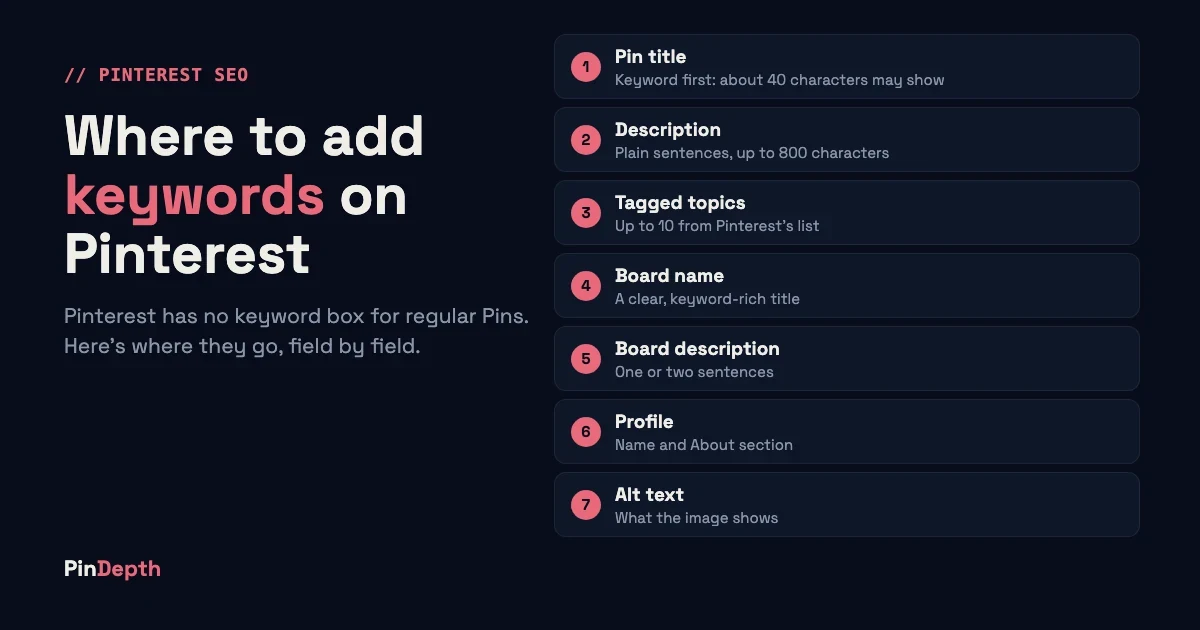
Pinterest has no keyword box for regular Pins. You add keywords by writing them into the Pin title, the description, the tagged topics, your board name and description, and your profile. Alt text, the last place, describes the image and can include your keyword naturally.
This guide walks through each field in order, with the limits Pinterest publishes and what to write in each one. It's for bloggers and Pinterest managers who already know which keywords they want and need to know where they go.
Key Takeaways
- Regular Pins have no keyword field. Keywords go into the title, description, tagged topics, board and profile. Alt text describes the image.
- Pin titles can be 100 characters, but only about the first 40 may show in feeds, so put the keyword first.
- Pin descriptions can be 800 characters and don't appear in the home or search feed, so write them for search, in plain sentences.
- The "keywords" setting people look for belongs to Pinterest ads, not to regular Pins.
Before you start
You need three things before you add a single keyword:
- A short keyword list. One main keyword per Pin, plus two or three close variations. If you don't have one yet, follow the step-by-step keyword research guide on our homepage.
- A Pinterest business account. The steps below use the business Pin builder.
- A desktop browser for some fields. A few options, such as alt text, can be easier to find on desktop than in the app.
Step 1: Pick one main keyword per Pin
A Pin aimed at five unrelated phrases makes it hard to tell what the Pin is about. Pick the one phrase that best describes the Pin, such as "easy weeknight chicken dinners". Then note two or three variations a searcher might type instead, such as "quick chicken dinner recipes".
Write the main keyword down before you open the Pin builder. You'll reuse it in the title, the description and the board, so the wording should stay the same in each place.
Step 2: Put the keyword at the start of the Pin title
By the end of this step, your Pin title leads with the main keyword.
Pinterest lets you enter up to 100 characters in a Pin title. Depending on the device, only the first 40 characters may show in people's feeds (Pinterest product specs). A keyword placed after character 40 can disappear from view.
- Open the Pin builder and find the Title field.
- Start the title with your main keyword: "Easy Weeknight Chicken Dinners: 15 Recipes Under 30 Minutes".
- Read the first 40 characters on their own. They should still make sense.
Check: if you cut your title at 40 characters, the main keyword is still there.
Step 3: Write the description in plain sentences
Pinterest allows up to 800 characters in a Pin description, and descriptions don't appear in the home feed or the search feed (Pinterest product specs). That changes how you write it. The title and image win the click; the description is there to tell Pinterest what the Pin is about.
- Open the Description field in the Pin builder.
- Write one to three sentences a person would actually say. Use the main keyword in the first sentence.
- Add one or two variations where they fit naturally, then stop.
For example: "These easy weeknight chicken dinners take under 30 minutes. You'll find quick chicken dinner recipes for the skillet, the oven and the slow cooker."
Check: read it out loud. If it sounds like a list of search terms, rewrite it.
Step 4: Tag related topics
The Pin builder has a Tag related topics option. Pinterest says you can add up to 10 related topics "to help people searching for similar ideas find your Pin" (Pinterest: Build a Pin).
- Find Tag related topics in the Pin builder.
- Start typing your main keyword and pick the closest topics Pinterest suggests.
- Choose only topics that describe this Pin. Accurate topics matter more than filling all 10 slots.
According to Pinterest's community forum, topics are chosen from Pinterest's own list, and other people can't see the topics you tag (Pinterest Business Community).
Step 5: Name boards with the keyword and describe them
By the end of this step, each board has a keyword-based name and a short description.
A Pinterest staff guide advises you to "use clear, keyword-rich titles that show what your board offers" and to weave keywords into board titles and descriptions (PinterestIvy, Pinterest Business Community, October 2025). A board called "Yum!" says nothing; a board called "Easy Weeknight Dinners" says exactly what's inside.
- Open the board and choose Edit board.
- Give it a short name built around a keyword phrase people search for.
- Add a description of one or two sentences that uses the keyword and a variation.
Keep the wording consistent. If the Pin, its board and its description all use the same phrase, the topic is clear. Our guide to evergreen vs seasonal Pinterest keywords helps you decide which keywords deserve a permanent board and which belong to a seasonal one.
Step 6: Add keywords to your profile
Your profile name and your About section describe your whole account. Many creators add a short keyword phrase next to their name, for example "Maya | Easy Family Recipes". That's practitioner advice rather than a documented Pinterest rule, but it costs nothing and tells visitors what to expect.
- Open Edit profile.
- Add a short keyword phrase to your name if it fits your brand.
- Write the About section in one or two sentences that name your main topics.
Step 7: Describe the image in alt text
By the end of this step, your Pin's image has a plain description for screen readers.
Alt text is mainly an accessibility feature: it describes the image for people who can't see it. Pinterest doesn't document it as a search field, so write it for people first. Write what the image shows, not a list of keywords. For example: "Skillet of lemon garlic chicken with rice on a wooden table."
Look for the alt text field in the Pin builder. On desktop it's often under More options. If you can't find it, skip this step rather than working around it.
Where each keyword goes: summary table
| Field | Where to find it | Limit Pinterest publishes | What to write |
|---|---|---|---|
| Pin title | Pin builder, Title | 100 characters; about the first 40 may show in feeds | Main keyword first |
| Pin description | Pin builder, Description | 800 characters; not shown in feeds | One to three plain sentences with the keyword and a variation |
| Tagged topics | Pin builder, Tag related topics | Up to 10 topics | The closest topics to your keyword |
| Board name | Board, Edit board | Not published | A short keyword phrase |
| Board description | Board, Edit board | Not published | One or two sentences with the keyword |
| Profile name and About | Edit profile | Not published | Your main topics in plain words |
| Alt text | Pin builder, often under More options | Not published | What the image shows |
Limits from Pinterest's product specs and Build a Pin, checked 2026-10-25.
Where keywords don't go
The ads "keywords" setting. Pinterest ads have their own keyword targeting option. It controls where a paid Promoted Pin can show, and it doesn't add keywords to a regular Pin. If you've searched Pinterest's settings for a keyword box and found nothing, this is why.
Hashtags as a substitute. Pinterest still lets you include hashtags in a description. In our view they don't replace a clear keyword in the title and description, so use them sparingly, if at all.
Common mistakes
Keyword stuffing. A description like "chicken dinner, chicken recipes, easy chicken, dinner ideas" reads like spam. Write sentences instead.
Different wording in every field. "Weeknight dinners" on the Pin, "Family meals" on the board and "Supper ideas" in the description send mixed signals. Pick one phrase and repeat it.
Generic board names. Names like "Food" or "Stuff I Love" ignore Pinterest's advice to use clear, keyword-rich board titles. Name boards after what people search for.
Hiding the keyword late in the title. If the keyword sits after the first 40 characters, many people never see it. Move it to the front.
Frequently asked questions
Does Pinterest have a keyword field?
Not for regular Pins. You add keywords by writing them into the title, description, tagged topics, board name, board description and profile. The only keyword setting is in Pinterest ads, where keyword targeting controls where a Promoted Pin can appear.
How many keywords should one Pin have?
A good working rule is one main keyword plus two or three close variations. More than that usually means the Pin is trying to cover too many topics at once.
Can I add keywords to Pins I've already published?
Often, yes. Pinterest lets you edit a Pin's title, description and board, "depending on the Pin". You can't change its image or video (Pinterest Help: Edit or delete a Pin).
Do hashtags still work on Pinterest?
Pinterest still lets you include hashtags in a description (Pinterest: Build a Pin). We haven't found Pinterest guidance saying they improve reach, so treat them as optional. Put your effort into the keyword in the title and description instead.
Find the keywords first
Adding keywords only works if they're keywords people actually search for. PinDepth, our Pinterest keyword research tool, starts from your niche. It builds the full keyword tree with Pinterest search volumes and marks each keyword evergreen or seasonal, so you know when to pin it. You can try it free for 5 days.
About the author
Soufiane is the founder of PinDepth. He grows Pinterest accounts and built the tool to automate the keyword research behind them.